
Bolly Game Help & Troubleshooting – Deposit, Withdrawal & Account Problems
BollyGameHub provides independent troubleshooting information for common Bolly Game problems, including deposits, withdrawals, bank-account details, login, installation, bonuses and referrals.
⚠️ 18+ WARNING: Bolly Game includes real-money gaming features. Only adults who meet the applicable legal-age requirements and whose local laws permit participation should use real-money features. Never share passwords, OTPs, UPI PINs or other authentication information while asking for help.
🛠️ Bolly Game Help & Support
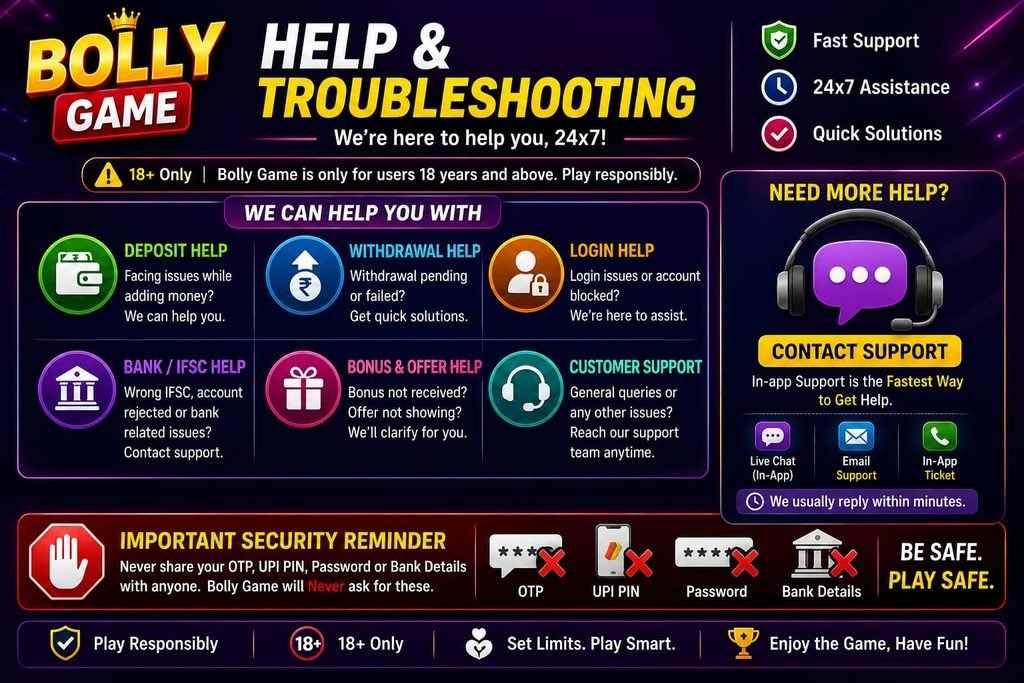
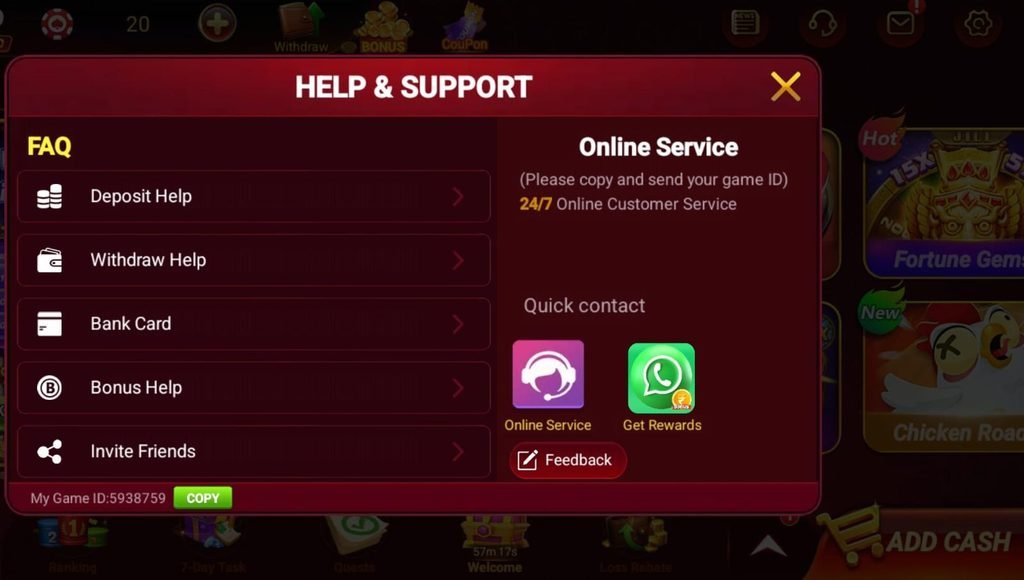
The Bolly Game Help & Support interface reviewed by BollyGameHub included dedicated help sections for Deposit Help, Withdraw Help, Bank Card, Bonus Help and Invite Friends.
The interface also displayed 24/7 Online Customer Service, a quick-contact option and Feedback.
Support options and interfaces can change, so use the current support route displayed inside your own app for account-specific problems.
💳 Deposit Problems
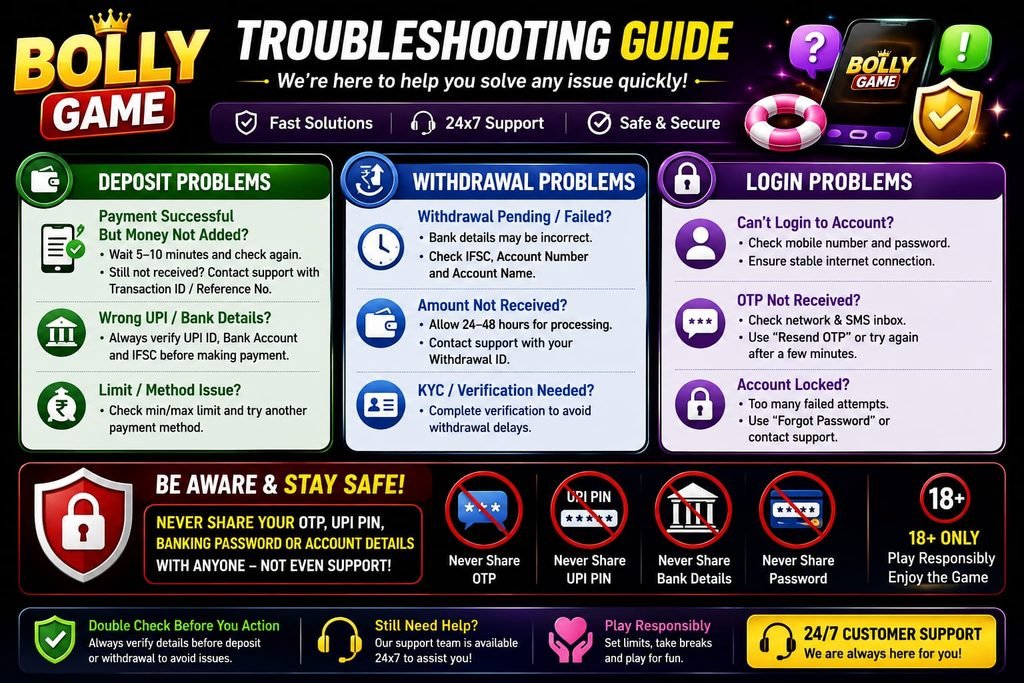
Deposit-related problems can include a payment that does not complete, a successful payment that does not appear in the game balance or difficulty using a particular payment method.
Deposit Successful but Balance Not Updated
The in-app Deposit Help reviewed by BollyGameHub states that bank-network issues can sometimes delay a deposit.
First confirm whether your bank or payment application shows the transaction as successful.
Do not immediately make the same payment again simply because the balance has not updated.
Deposit Missing for 24 Hours
The in-app Help reviewed for this guide says that if a successful payment has not arrived within 24 hours, users should contact customer service.
The Help information asks users to provide a screenshot showing the successful payment and the relevant 12-digit UTR, UPI reference number or UPI transaction ID.
Do not send an OTP, UPI PIN or banking password as proof of payment.
Unable to Deposit
The in-app Help recommends checking whether sufficient balance is available and trying another currently available payment method when appropriate.
Do not send money directly to an unknown person who claims they can manually add balance to your account.
Deposit Minimum
The Deposit Help reviewed by BollyGameHub states a minimum first deposit of Rs. 50 and a normal minimum deposit of Rs. 100.
Check the current deposit screen because these limits can change.
🏦 Withdrawal Problems
Withdrawal problems can involve eligibility, linked bank information, IFSC details, processing time or platform-specific requirements.
Withdrawal Failed
The in-app Withdrawal Help reviewed by BollyGameHub advises users to check whether the linked bank-account information is correct.
The Help information specifically tells users to verify the IFSC code.
If incorrect information can be corrected through the current interface, carefully enter the correct details and follow the current withdrawal instructions.
Withdrawal Is Delayed
The in-app Help reviewed by BollyGameHub says withdrawal arrival depends on bank working hours and typically takes 1–2 days.
This is guidance rather than a guarantee.
If a withdrawal remains unresolved beyond the expected period, check its current status and use the current customer-support route.
Withdrawal Amount Is Not Available
The withdrawal screen reviewed by BollyGameHub displayed an Eligible Withdrawal amount separately from the overall balance and also referenced betting or eligibility requirements.
This means the full displayed balance may not always be immediately available for withdrawal.
Check the current eligibility information shown in your own account.
Withdrawal Limit Looks Different
The in-app Help reviewed by BollyGameHub states a withdrawal range of Rs. 100 to Rs. 50,000.
However, the actual withdrawal screen we reviewed showed Rs. 300 as the lowest visible preset.
Because these two interfaces were not identical, check the current withdrawal options displayed in your own account rather than relying on an old figure.
🔐 Bank Account and IFSC Problems
The bank-binding interface reviewed by BollyGameHub requests information including bank, account number, confirmation of account number, receiver name and IFSC code.
Wrong Account Number
Carefully compare the account number with your bank information before saving it.
The interface asks for the account number twice, which can help identify typing mistakes.
Wrong IFSC Code
The withdrawal troubleshooting information specifically highlights the IFSC code.
Verify the correct IFSC for the relevant bank account before submitting it.
Bank Account Already Linked
The in-app Help reviewed by BollyGameHub states that one bank account can only be linked to one game account.
The account-binding interface also displayed a one-account-per-wallet type restriction.
Do not enter another person’s bank information simply to bypass a binding problem.
Bank Details Need to Be Changed
Use only the options currently provided by the platform or its current customer-support process.
Do not give an unknown person your OTP, banking password or other authentication information to change bank details.
🔑 Bolly Game Login Problems
If you cannot log in, first check basic account and device issues before creating another account.
Check Internet Connection
Confirm that your Wi-Fi or mobile data is working.
Check Login Information
Make sure the mobile/account information and password are being entered correctly.
Restart the App
Close Bolly Game completely and reopen it. Restart the phone if necessary.
Check for an Update
If the installed app is outdated, use the intended update route rather than downloading an unknown APK sent through a random message.
Use Current Account Recovery
If you have forgotten your password or lost account access, use the recovery or customer-support process currently provided by the platform.
Never pay an unknown person who claims they can secretly unlock your account.
📲 APK Installation Problems
Android APK installations can fail because of an incomplete download, insufficient storage, installation permissions or compatibility issues.
APK Will Not Install
Check whether the APK downloaded completely and whether sufficient storage is available.
Installation Permission Is Blocked
Android may require permission for the browser or file manager used to open an APK distributed outside Google Play.
Only enable installation for a source you intentionally selected and review the permission afterwards.
App Installs but Does Not Open
Check the internet connection, restart the app and phone, and check whether an appropriate update is available.
Do not disable important security protections permanently just to force an app to run.
🧰 Click to Repair
The Bolly Game Settings screen reviewed by BollyGameHub included a Click to Repair option.
If this option is still available in your current version, it may be useful when the app has certain loading or resource-related problems.
Open the current Settings area and look for Click to Repair.
Follow the instructions shown by the app.
Do not assume this tool can fix account, deposit or withdrawal problems that require customer support.
🎁 Bonus or GULLAK Problem
The in-app Bonus Help reviewed by BollyGameHub states that certain bonuses require tasks to be completed and that eligible completed-task bonuses can appear in GULLAK.
Bonus Did Not Appear
Check whether all current task requirements were actually completed.
Check GULLAK or the current bonus area for the reward.
Remember that promotional eligibility and amounts can change.
Cashback Is Different Than Expected
The Bonus Help we reviewed included a 10% cashback example involving eligible GULLAK bonus and a game loss.
An example should not be treated as a permanent cashback guarantee.
Check the current GULLAK conditions displayed in your account.
Old Bonus Amount Is No Longer Available
Promotions can change.
For example, BollyGameHub observed promotional messages advertising ₹81 cashback on a ₹100 recharge and ₹18 for registration/mobile linking.
If your current account shows different values, follow the current offer rather than assuming an older promotion remains active.
👥 Refer & Earn Problems
Bolly Game includes an Invite Friends system, but simply sharing a link should not be treated as guaranteed income.
Referral Reward Not Received
Check whether the invited user completed the current qualifying requirements.
The in-app Help reviewed by BollyGameHub indicates that invited-user recharge/deposit activity can be relevant to commission.
₹70 Invite Offer Not Showing
A promotional message reviewed by BollyGameHub advertised ₹70 for one new-user invite and rewards up to ₹3,500.
These are observed promotional figures, not permanent guarantees.
If your current Invite Friends screen shows different terms, follow the current campaign.
Referral Level Not Increasing
The in-app Help reviewed by BollyGameHub indicates that invited users and their deposit activity can contribute to referral-level progression.
Check the current referral dashboard for account-specific requirements.
🎧 How to Contact Bolly Game Customer Service
The Help & Support interface reviewed by BollyGameHub displayed 24/7 Online Customer Service, quick contact and Feedback options.
For an account-specific deposit, withdrawal, bank, bonus or login problem, use the current support option displayed inside the platform.
Before contacting support, prepare only the information relevant to the problem.
For a payment-credit problem, the in-app Help may request a successful-payment screenshot and transaction/reference number.
🔒 What You Should Never Send to Support
Never send sensitive authentication information simply because someone claims to be customer support.
Do Not Share Your Password
Your account password should remain private.
Do Not Share an OTP
An OTP is authentication information and should not be given to another person.
Do Not Share Your UPI PIN
A UPI PIN is used to authorize payments. Customer support does not need your UPI PIN as proof that a payment occurred.
Do Not Share Banking Passwords
Keep internet-banking passwords and other authentication credentials private.
Be Careful With Screenshots
Before sending a screenshot, check whether it unnecessarily exposes personal, banking or authentication information.
🚨 Beware of Fake Support
Be cautious of people contacting you through social media or messaging apps who claim they can guarantee a withdrawal, unlock an account, provide a secret bonus or guarantee game results.
Do not pay an unknown person to speed up a withdrawal.
Do not install remote-access software because an unknown support person asks you to.
Do not provide an OTP, password, UPI PIN or banking password.
Use the current support route available through the intended platform.
Frequently Asked Questions
What should I do if my Bolly Game deposit is not credited?
First confirm that the payment was successful. The in-app Help says bank-network issues can cause delays. Avoid immediately repeating the payment.
What if my successful deposit is missing for 24 hours?
The in-app Help reviewed by BollyGameHub says to contact customer service and provide a successful-payment screenshot plus the relevant 12-digit UTR, UPI reference number or UPI transaction ID.
Why did my Bolly Game withdrawal fail?
Check the linked bank-account information and especially the IFSC code. Use current customer support if the issue continues.
How long can a Bolly Game withdrawal take?
The in-app Help reviewed by BollyGameHub says it typically takes 1–2 days depending on bank working hours. This is not a guaranteed arrival time.
Why is my full balance not available for withdrawal?
The withdrawal interface we reviewed displayed Eligible Withdrawal separately and referenced eligibility or betting requirements. Check the current requirements in your account.
What should I do if Bolly Game will not open?
Check your internet connection, restart the app and device, check for an appropriate update and use Click to Repair if it remains available and is relevant.
What should I do if my bonus is missing?
Check whether the current task requirements were completed and check the GULLAK/bonus area. Promotional conditions can change.
Why did I not receive my referral reward?
Check the current qualifying requirements. Invited-user recharge/deposit activity can be relevant according to the in-app Help reviewed by BollyGameHub.
Does Bolly Game have customer support?
The Help & Support interface reviewed by BollyGameHub displayed 24/7 Online Customer Service, quick contact and Feedback options. Current availability should be checked in the app.
Should I give customer support my OTP or UPI PIN?
No. Keep OTPs, UPI PINs, passwords and banking authentication information private.
- Bolly Game Download
- Bolly Game Login & Registration
- Bolly Game Deposit Guide
- Bolly Game Withdrawal Guide
- Bolly Game Bonus & Offers
- Bolly Game Refer & Earn
- Bolly Game Safety & Responsible Play
🛡️ 18+ and Responsible Help Notice
Bolly Game includes real-money gaming features. Only adults who meet applicable legal-age requirements and whose local laws permit participation should use real-money features.
If a deposit or withdrawal problem occurs, do not continue depositing or playing simply to recover money or force a withdrawal.
Never borrow money, chase losses or use money needed for essential expenses.
BollyGameHub is an independent informational website and is not Bolly Game customer support. We cannot access accounts, deposits, withdrawals, bonuses or banking information. Platform features, limits and support procedures can change.